# How to log users in with the Unite IdP
The Unite Identity Provider (IdP) is an OpenID Provider. Unless this page says otherwise, follow the relevant specification below. This page only covers what's specific to Unite: extensions, custom claims, and the places where the IdP differs from the specifications. Treat any other difference as a bug, and report it to Unite.
The IdP implements these specifications:
- OpenID Connect Core 1.0, with the Authorization Code Flow
- OpenID Connect Discovery 1.0
- OpenID Connect RP-Initiated Logout 1.0
- OpenID Connect Back-Channel Logout 1.0
- OAuth 2.0 (RFC 6749) and Bearer Token Usage (RFC 6750)
- PKCE (RFC 7636), Token Revocation (RFC 7009) and Issuer Identification (RFC 9207)
Key terms
| Term | Definition |
|---|---|
| Tenant | A Unite customer. A tenant has one or more publications and its own issuer. |
| Publication | A website or app of a tenant. |
| User | The person who logs in to your publication. A user has an account at one tenant. |
| Customer | A person or organisation registered in Connect. A user is tied to at most one customer, and isn't necessarily the same person as the customer. |
| Subscription | Access to the content of a product. It belongs to a customer. |
| Connect | Your tenant's subscription system. It holds the customers and their subscriptions. |
| Relying Party (RP) | An app that logs users in with the IdP, such as your website or mobile app. Unite registers each RP as a client of one tenant. |
| Auth host | The host name of the IdP for your tenant, such as account.example.com. By convention, Norwegian and Swedish sites use konto, for example konto.example.no. |
| Upstream IdP | An external identity provider that the IdP can send the user to, such as Vipps. |
How login works
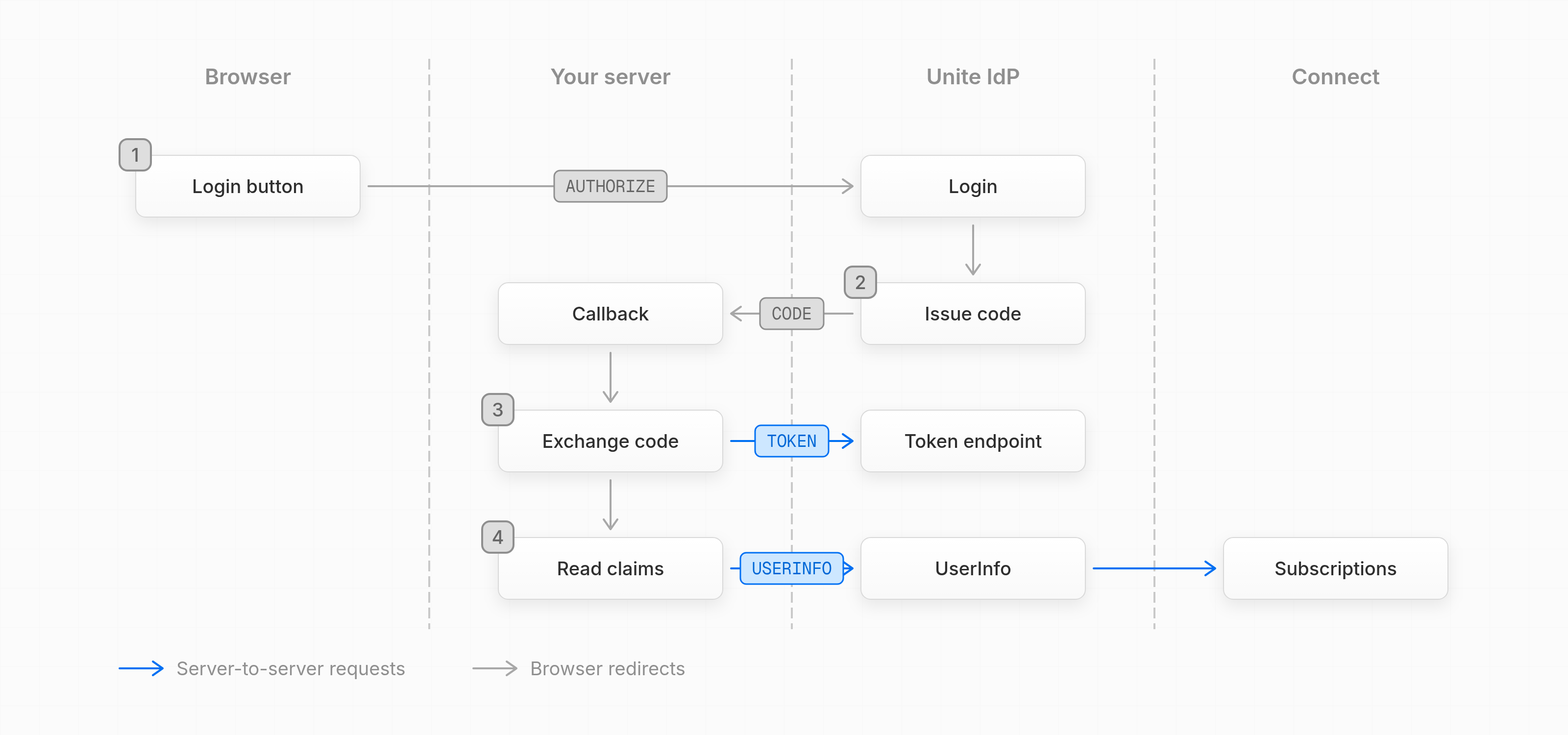
Your app uses the Authorization Code Flow and reads the user's claims, including subscriptions, from UserInfo. In the diagram, gray arrows are browser redirects, and blue arrows are server-to-server requests.
Issuer
Each tenant has one issuer: the auth host with the path /api/auth. Read the endpoints from {issuer}/.well-known/openid-configuration.
https://account.example.com/api/auth
Client registration
Unite registers your app as a client of your tenant. Give Unite your redirect URIs, your post-logout redirect URIs and, optionally, a back-channel logout URI. The IdP narrows the specifications in these ways:
- Response type:
codeonly, with thequeryresponse mode - Client authentication: we support
client_secret_basic,client_secret_postandclient_secret_jwtfor a confidential client, andnonefor a public client. We preferclient_secret_postorclient_secret_jwt - Server-side calls: call the token endpoint and UserInfo from your server or your native app. The IdP doesn't support browser-only clients that call them from JavaScript
Authorization request
The IdP currently ignores login_hint, ui_locales, acr_values and claims_locales, and it currently doesn't support the claims and request parameters. The login pages use your tenant's language, and ID tokens have no acr or amr claims. If support for any of these would help you, tell Unite.
identity_provider
identity_provider is an extension parameter that picks the login method:
| Value | Behavior |
|---|---|
vipps |
Sends the user straight to Vipps Login. Your client needs Vipps enabled. |
credentials |
Shows the email and password form, without the login start screen. |
It only applies when the user has to log in. Any other value returns invalid_request with the description Unsupported identity_provider.
prompt
The IdP supports none, login and consent, and other values return invalid_request. With prompt=login, if a different account logs in, the IdP first ends the previous IdP session, with back-channel logout.
state
The IdP doesn't require state, but we highly recommend it, so the callback is protected against cross-site request forgery. Use a cryptographically random value per login and check it in your callback.
nonce
The IdP doesn't require nonce, but we highly recommend it, so an ID token can't be replayed into another login. Use a cryptographically random value per login, and check that the ID token contains the same nonce.
PKCE
Send code_challenge with code_challenge_method=S256 in the authorization request, and code_verifier in the token request. The IdP only accepts S256, and it rejects a code_challenge without a method. Public clients must use PKCE, and we recommend it for confidential clients too.
Tokens
The IdP uses these lifetimes:
| Token | Lifetime |
|---|---|
| Authorization code | 15 minutes, one use |
| Access token | 8 hours |
| ID token | 15 minutes |
| Refresh token | 30 days |
| Grant behind the refresh tokens | Up to 1 year |
Access tokens
Access tokens are opaque. Use them to call UserInfo.
ID tokens
ID tokens contain sid only for clients with a back-channel logout URI. Read the profile, email, phone and subscription claims from UserInfo.
Refresh tokens
To get a refresh token, your client needs the refresh_token grant and the offline_access scope, and the authorization request must contain offline_access and prompt=consent. The IdP shows no consent screen, so prompt=consent adds no step for the user. If your client doesn't have the offline_access scope, the request fails with invalid_scope, so ask Unite to add it.
The IdP rotates refresh tokens by client type:
| Client | Rotation |
|---|---|
| Public | A new refresh token on every use |
| Confidential | A new refresh token after 70% of its lifetime |
Using a refresh token that was already rotated returns invalid_grant and revokes the whole grant, so don't send the same refresh token in two parallel requests. When the grant expires, send the user through the login again. If the IdP session still exists, the user sees no login screen.
A password change and a deactivated account revoke the user's refresh tokens. A logout keeps refresh tokens, as offline_access intends, so revoke them as described under Logout.
Claims
The IdP returns these claims by scope, and has one custom scope, subscriptions:
| Scope | Claims | Returned in |
|---|---|---|
openid |
sub |
ID token, UserInfo |
profile |
given_name, family_name |
UserInfo |
email |
email, email_verified |
UserInfo |
phone |
phone_number, phone_number_verified |
UserInfo |
subscriptions |
subscriptions, products |
UserInfo |
The subscriptions scope returns the customer's subscriptions from UserInfo. The claims have these types and sources:
| Claim | Type | Description |
|---|---|---|
sub |
string (UUID) |
The user's ID, unique in the tenant. |
given_name, family_name |
string |
Read from Connect for each request. Only when the user is tied to a customer. |
email, phone_number |
string |
From the user's login credential. If there's none, from Connect, with *_verified set to false. Left out when there's no value. |
products |
string[] |
The product codes of the entries in subscriptions. |
subscriptions |
object[] |
The customer's subscriptions that give access now. Empty when the user isn't tied to a customer. |
Each entry in subscriptions has these fields:
| Field | Type | Description |
|---|---|---|
product |
string |
The product code. |
startTime |
number |
Epoch milliseconds. 0 when unknown. |
endTime |
number |
Epoch milliseconds. 253402300799000 when there's no end. |
stopped |
boolean |
Whether the subscription is stopped. |
subscriberState |
string |
Always valid. |
couponCode |
string |
Optional. |
couponNumber |
number |
Optional. |
promotion |
string |
Optional. |
isTemporary |
true |
Optional. Access from a purchase that Connect hasn't recorded yet. It lasts 4 days from the order. |
This is a UserInfo response for a user who is tied to a customer with one subscription:
{
  "sub": "your_user_id",
  "given_name": "Kari",
  "family_name": "Nordmann",
  "email": "kari@example.com",
  "email_verified": true,
  "products": ["DIGITAL"],
  "subscriptions": [
    {
      "product": "DIGITAL",
      "startTime": 1767225600000,
      "endTime": 253402300799000,
      "stopped": false,
      "subscriberState": "valid"
    }
  ]
}
The IdP reads the subscriptions from Connect for each UserInfo request and doesn't cache them. If Connect doesn't answer, UserInfo returns an error, so retry later.
Logout
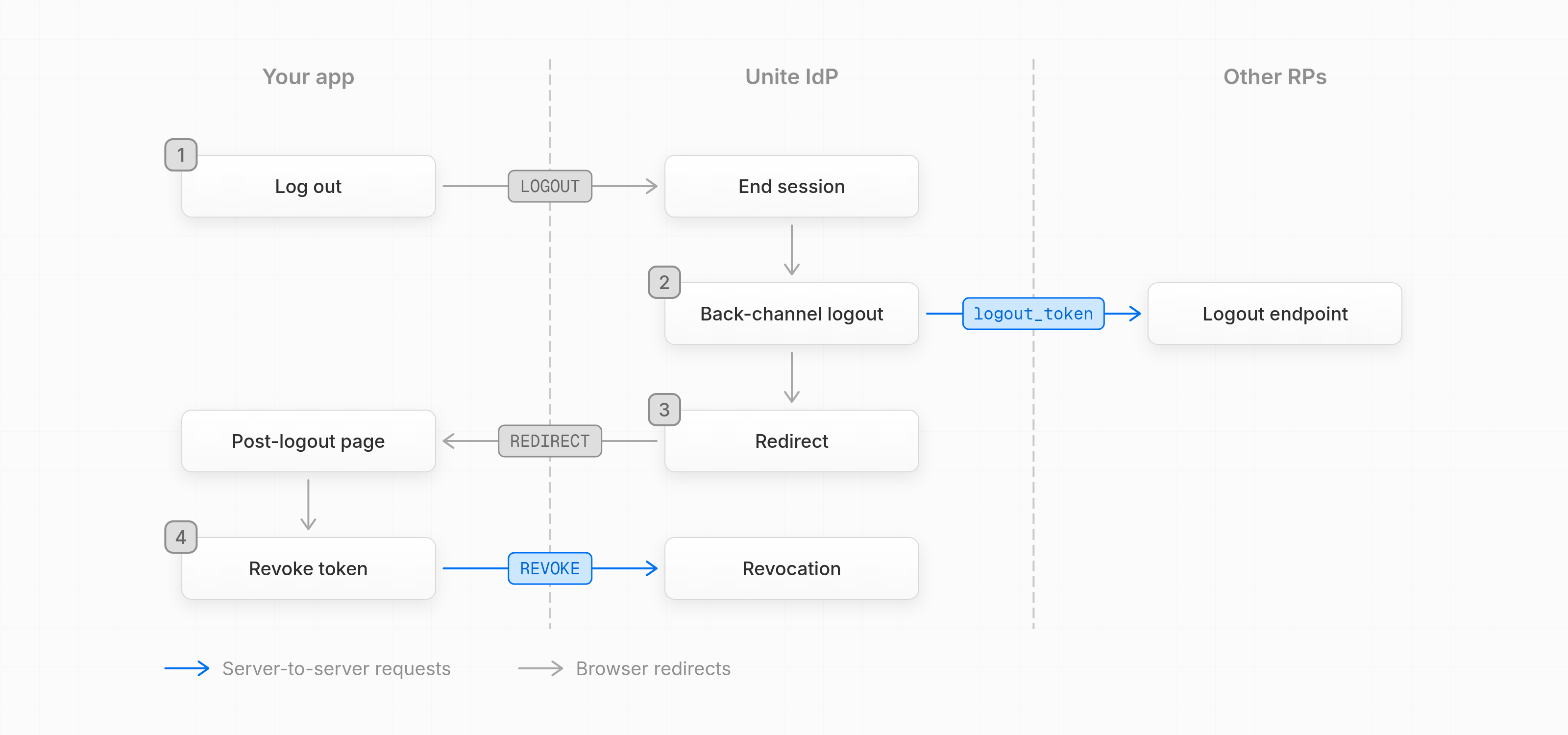
A full logout has two steps, because the IdP session and your tokens are separate:
| Step | Endpoint | What it ends |
|---|---|---|
| End the IdP session | End session endpoint, in the browser | The single sign-on session, for every RP in it |
| Revoke your tokens | Revocation endpoint, from your server | Your refresh token, and the access tokens issued with it |
In the diagram, gray arrows are browser redirects, and blue arrows are server-to-server requests.
End the IdP session
Redirect the browser to the end session endpoint with id_token_hint or client_id, plus post_logout_redirect_uri. The IdP ends the IdP session for every RP the user logged in to with it, not only yours, and sends a back-channel logout to each RP that has a back-channel logout URI. The next authorization request then shows the login screen.
The IdP then redirects the browser to your post_logout_redirect_uri, with state if you sent it. Without a post_logout_redirect_uri, the user lands on your tenant's home page. The IdP ignores post_logout_redirect_uri when the request has neither id_token_hint nor client_id. For a native app redirect URI, the IdP shows a logout button, because in-app browsers open an app only after a user gesture.
Revoke your tokens
When your user logs out of your app, revoke your refresh token at the revocation endpoint. The IdP then also revokes the access tokens issued with it, so UserInfo rejects them. Revoke the refresh token even when you don't end the IdP session, for example when the user logs out of your app only.
Back-channel logout
A back-channel logout tells your server that the user's IdP session ended, also when it ended from another RP or because the user logged in with a different account with prompt=login. Use it if your server keeps its own session for the user, such as a session cookie, so you can end that session too.
To get back-channel logouts, give Unite a back-channel logout URI. Each time an IdP session ends at the end session endpoint, the IdP sends a logout_token to that URI, also when your own app started the logout. The logout_token always contains sid, and so do your ID tokens, so you can find the local session that belongs to it. Validate the logout_token as Back-Channel Logout 1.0 describes, end that local session, and revoke its refresh token.
The IdP sends each back-channel logout once. It doesn't follow redirects or retry, and the logout goes on when your endpoint fails, so the URI must answer the request itself.
Errors
Errors from an upstream IdP pass through unchanged, such as access_denied from Vipps. Treat any error code you don't know as a failed login.
A login must finish within 15 minutes. After that, the IdP shows its error page and your app gets no response.
Differences from the specifications
| Difference | Specification | Status | Why, or what to do |
|---|---|---|---|
| No consent screen | OpenID Connect Core 1.0, Section 3.1.2.1 | By design | Every RP is run by or for the tenant, and the user accepts the tenant's terms at signup |
PKCE S256 only |
RFC 7636, Section 4.2 | By design | Follows RFC 9700 |